
Whatsapp: +86-18537309643 Email: cathy@unioncoding.com

Views: 0 Author: Site Editor Publish Time: 2026-04-10 Origin: Site
Troubleshooting Guide: How to Fix Print Position Deviation on Your Markem X40
Is your Markem X40 thermal transfer printer drifting out of alignment? Nothing disrupts a production line faster than inconsistent print placement. If your codes are shifting, cutting off, or printing in the wrong spot, don't panic.
In this guide, we will walk you through the essential steps to calibrate your machine and fix print position deviation.
Hey there, fellow operator!
Is your Markem X40 acting up again? I know the feeling. You're trying to get the line running, and suddenly the print starts drifting all over the place. It's frustrating, but after years of tinkering with these machines, I've learned that it's usually not a major breakdown—just a finicky calibration issue.
A War Story from the Trenches
Let me tell you about a call I got last month from a plant manager named Dave. He was ready to pull his hair out. He told me, "My X40 is possessed! It prints fine for ten minutes, then the batch code starts drifting to the right, and eventually, it cuts off the date entirely."
He thought the printhead was dead. He was about to order a replacement. I told him to hold off. I walked him through a physical check, and you know what we found? It wasn't the electronics. It was the ribbon core. The locking tab on the rewind hub had worn down, and under high-speed tension, the ribbon was slipping just a fraction of a millimeter every few rotations. That tiny slip added up to a massive drift over time. We swapped the hub, and he was back in business in five minutes.
The point is: don't panic. Let's grab a coffee and walk through how to get that print registration back on point.
The "Sanity Check": Media and Ribbon Path
Before we start pushing buttons in the menu, let's look at the hardware. 90% of the time, the issue is physical.
Ribbon Wrinkles: Take a look at your ribbon path. Is it feeding smooth as butter, or is it bunching up? A wrinkled ribbon is a surefire way to get skewed prints. Make sure the ribbon cores are locked in tight.
The "Wobble" Test: Watch your film or packaging material as it goes through the guides. If it's dancing around left and right, your print is going to wander. Tighten those guides up so the material tracks straight.
Tweak the "Print Position" (The Magic Numbers)
If the hardware looks good, we need to talk to the printer. The Markem X40 menu can be a maze, but we're looking for the offset settings.
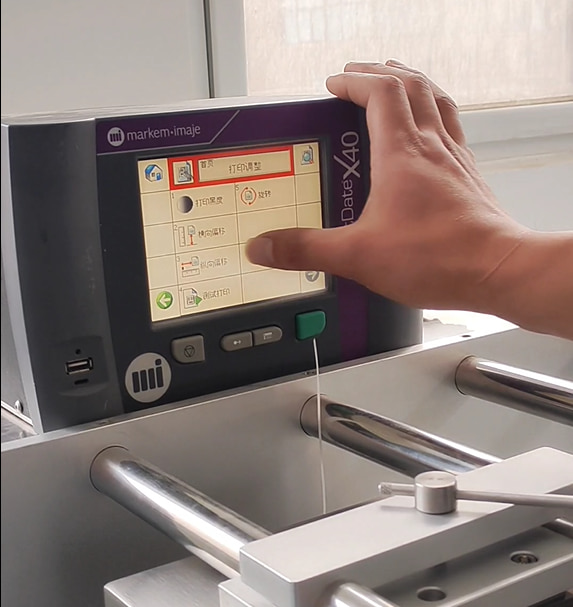
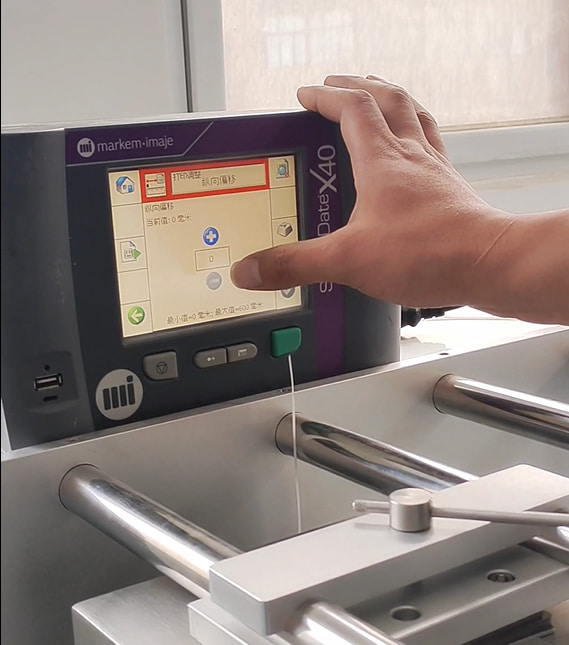
Head over to the Setup or Print Setup menu on your controller.
Find Print Position (sometimes called Label Offset).
**Vertical Adjustment **(Y-axis) Think of this as moving the paper up or down in a typewriter. If your print is creeping too high or too low on the pack, tweak this value.
**Horizontal Adjustment **(X-axis) This controlswhen the printer fires relative to the sensor. If the print is too far left or right, this is your dial to turn.
Teach the Sensors (Calibration)
Here is a trick I use often: The printer might just be "confused" about where the label starts. It happens to the best of us.
Auto-Calibration: Go into the sensor menu and run the auto-calibration routine. Let the machine "learn" the gap or notch of your specific material. It's like hitting the reset button for its eyes.
Trigger Delay: If you are using an external "electric eye" (sensor) on the line, check the Trigger Delay. If the delay is off by even a millisecond, the print will land in the wrong spot. Adjust this until the timing feels snappy.
A Word on Tension
Finally, check your tension. If the take-up hub (the thing winding the ribbon) is lazy and not pulling tight, the ribbon will slip, causing the print to drift slowly over time. Make sure it's winding with a bit of muscle.
Summary Checklist for the Shop
[1] Check for ribbon wrinkles (smooth it out!).
[2] Adjust Y-axis offset in the menu.
[3] Run the sensor auto-calibration.
[4] Check the trigger delay timing.
Give these steps a try. Usually, a quick calibration is all it takes to get your X40 singing again. If you're still stuck or need fresh ribbons, give us a shout. We've got your back